Showing posts with label Issues/Resolution. Show all posts

Wednesday, July 24, 2013

How to expose a hidden field in Siebel list applet?

This is a very simple requirement that I am talking about today, where on a button click you are required to do a GetFieldValue() of a active BC field, which is NOT exposed on the UI and doesn't have the Force Active property checked. If you try to do that, system prompts an error sayng:

A script failed to get the value for field <field name> because the field was not active.(SBL-EXL-00119)

So the basic solution anybody can tell is, "why don't you expose the field on the applet with HTML Type = Hidden?"

Well, this sounds very simple and works fine also, but ONLY in the form applet. So in a form applet, if you expose a field with HTML Type = "Hidden", then it will not be visible to the user and you can easily do GetFieldValue of that field. But the same thing doesn't work if it is a List Applet, even if HTML Type = Hidden, the list column would be visible.

The only workaround I found was, set the HTML Type = Hidden and instead of exposing the field as the list column, expose it as the control i.e. expose at any empty placeholder where you can expose buttons/labels etc. It works fine.

Wednesday, July 27, 2011

Child Field Read Only depending on Parent Field Value

Sometimes it happens that you get a very simple requirement to implement and in a single glance you say, "Well, this is very easy to implement" and when you actually see the result on the UI after the configuration you have done, you start scratching your head to find out the reason for not getting the result as per the expectation.

Today, I am going to discuss a very simple requirement you might have faced earlier.

Requirement
I have two applet exposed on the UI: 1) Opportunity Form Applet 2) Quote List applet.
Opportunity being the parent applet and quote as the child as per below screen shot.


The simple requirement is to make "Comments" field on Quote List Applet editable, if and only if Sales Stage of Opportunity = Data Entry.

very simple isn't it! Anyone can easily say, go and use "Field Read Only Field" user property at Quote business component and you are done. I reacted to it in the similar manner and followed the below steps:
1. Pull "Sales Stage" value on Quote BC.
2. Create a calc field to set to Y, if Sales Stage = "Data Entry"

3. Create a BC User property, Field Read Only Field based on calc field.


Compile the SRF.

Navigate to Opportuity -> Quote view to verify the results. I created an Opportunity record, set the Sales Stage to "Data Entry" and then created a Quote record. "Comments" field was editable. Then I changed the Sales Stage to "Submitted" and per configuration I was expecting the "Comments" field to be read only, but to my surprise, it was not. Still, I was able to edit the field.


It might happen that change of "Sales Stage" at the Opportunity level is not getting reflected at the quote level. Let me try running a blank query (Alt+Q, then enter) to refresh and now..... yes, "Comments" field get read-only. So, basically the problem is, Quote BC is not aware of the change in Sales Stage at Opportunity level, unless you refresh it.

(Note: this is not the case with "Parent Read Only Field" user property. Change at parent field immediately gets reflected at the child level.
You can refer this post for more details.)

Now, the problem here is to get the Quote list applet refreshed, if some change happens at Opportunity. One might point out that you should have "Immediate Post Changes" as True for "Sales Stage". But, keep in mind that "Immediate Post Changes" will only refresh the fields of the same business component, not of the child BC.

One solution, I can think of is to refresh the Opportunity business component in such a way that it should not loose the record context and consequently, Quote BC will automatically gets refreshed. But, I didn't want to do the scripting on Opportunity WriteRecord event, just to refresh the Quote BC, something like:

function BusComp_WriteRecord ()
{


TheApplication().GetService("FINS Teller UI Navigation").InvokeMethod("RefreshCurrentApplet", TheApplication().NewPropertySet(), TheApplication().NewPropertySet());
}

So, I found a better way to achieve to refresh the Opportunity form applet. Just create the following user property on the Opportunity applet:


Compile the SRF and check the result on the UI. Voila, everything is working as desired now.


.

Tuesday, December 29, 2009

Siebel Application Menu Items / Applet Menus items doesn't work in IE 8.0??

If you are getting tough time after upgrading your Internet Explorer to version 8.0 and if you have observed that no Menu items is working across the application i.e. Application Menus, Applet Menus etc, then don't get panic, this is something due to the new version only of IE. But not to worry here, IE 8.0 provides the facility of running the browser in compatibility view where it allows the browser to behave like the older version.

Here below are the steps you need to follow :
1. Click on IE -> Tools Menu.

2. Select the option "Compatibility View".

3. Refresh the current web page.

4. Everything should work fine.
.

Thursday, December 24, 2009

Problem while exporting data from Siebel in IE 7.0 or IE 8.0?

When I tried taking the export from Service Request list applet, I saw a difference in the way export applet was behaving in comparison with how it used to worked in IE 6.0. Right now I am using IE 7.0.

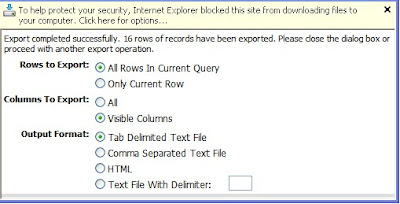
So let me tell you the complete scenario what happened: From Service Request list applet, I clicked on Menu -> Export and as per expectation Export applet came up and I clicked on "Next" button. Here below is what I saw:

Due to extra security provided by new IE version, I received this popup message in export applet saying : "To help protect security, Internet Explorer blocked this site from downloading files to your computer. Click here for options...".

Alright, no issues, it always good to have extra security, so I selected the option "Download File...". Now that msg get disappeared and again I need to click on Next button to start the export process. I clicked on Next and everything worked fine as I can see the "File Download" applet get popped and I can easily see the exported data. So far, so good !!

But here is something I observed that I want to share. After taking export sucessfully for the very first time, I was not able to do "Export" anymore. Whenever I clicked on "Applet Menu-> Export", nothing happened, tried lot many unsuccessful attempts. hhmmmm, well is Siebel allowed taking export from list applet only once??? Nope, there is something wrong here with IE settings. A similar kind of issue I have already discussed earlier:
http://siebelmantra.blogspot.com/2009/02/siebel-high-interactivity-framework.html

So a temporary fix for this export issue is to keep pressing the "Ctrl" key on the keyboard and it worked fine. But to get the permanent fix, here below is what you need to do, in case you see this kind of issue.

1. Click on IE Tools Menu -> Internet Options.

2. Go to Security tab, click on "Custom Level", scroll down to "Downloads" section.

3. Make "Enable" for "Automating prompting for file downloads".

4. And you are done.

Restart the web client and try taking export now, hopefully system should not popup message in export applet and taking export multiple times should also work fine.

.