Showing posts with label Siebel Interview Question. Show all posts

Wednesday, July 27, 2011

Child Field Read Only depending on Parent Field Value

Sometimes it happens that you get a very simple requirement to implement and in a single glance you say, "Well, this is very easy to implement" and when you actually see the result on the UI after the configuration you have done, you start scratching your head to find out the reason for not getting the result as per the expectation.

Today, I am going to discuss a very simple requirement you might have faced earlier.

Requirement
I have two applet exposed on the UI: 1) Opportunity Form Applet 2) Quote List applet.
Opportunity being the parent applet and quote as the child as per below screen shot.
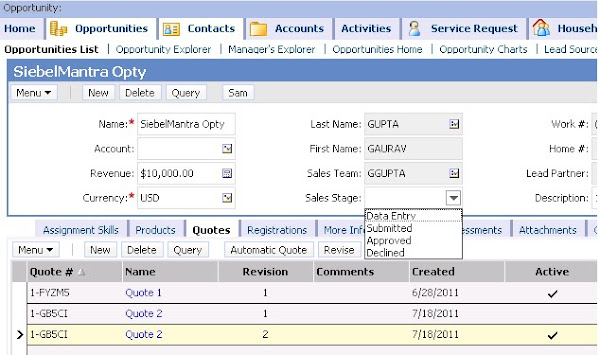

The simple requirement is to make "Comments" field on Quote List Applet editable, if and only if Sales Stage of Opportunity = Data Entry.

very simple isn't it! Anyone can easily say, go and use "Field Read Only Field" user property at Quote business component and you are done. I reacted to it in the similar manner and followed the below steps:
1. Pull "Sales Stage" value on Quote BC.
2. Create a calc field to set to Y, if Sales Stage = "Data Entry"

3. Create a BC User property, Field Read Only Field based on calc field.



Compile the SRF.

Navigate to Opportuity -> Quote view to verify the results. I created an Opportunity record, set the Sales Stage to "Data Entry" and then created a Quote record. "Comments" field was editable. Then I changed the Sales Stage to "Submitted" and per configuration I was expecting the "Comments" field to be read only, but to my surprise, it was not. Still, I was able to edit the field.
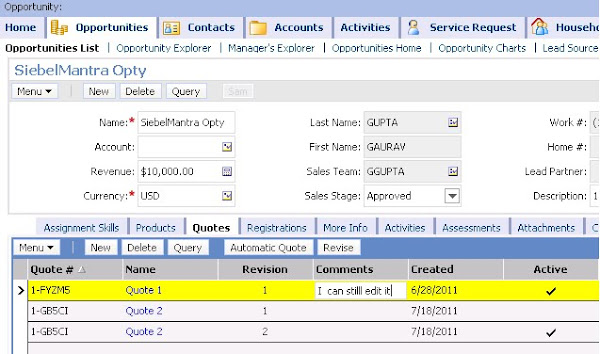

It might happen that change of "Sales Stage" at the Opportunity level is not getting reflected at the quote level. Let me try running a blank query (Alt+Q, then enter) to refresh and now..... yes, "Comments" field get read-only. So, basically the problem is, Quote BC is not aware of the change in Sales Stage at Opportunity level, unless you refresh it.

(Note: this is not the case with "Parent Read Only Field" user property. Change at parent field immediately gets reflected at the child level.
You can refer this post for more details.)

Now, the problem here is to get the Quote list applet refreshed, if some change happens at Opportunity. One might point out that you should have "Immediate Post Changes" as True for "Sales Stage". But, keep in mind that "Immediate Post Changes" will only refresh the fields of the same business component, not of the child BC.

One solution, I can think of is to refresh the Opportunity business component in such a way that it should not loose the record context and consequently, Quote BC will automatically gets refreshed. But, I didn't want to do the scripting on Opportunity WriteRecord event, just to refresh the Quote BC, something like:

function BusComp_WriteRecord ()
{


TheApplication().GetService("FINS Teller UI Navigation").InvokeMethod("RefreshCurrentApplet", TheApplication().NewPropertySet(), TheApplication().NewPropertySet());
}

So, I found a better way to achieve to refresh the Opportunity form applet. Just create the following user property on the Opportunity applet:


Compile the SRF and check the result on the UI. Voila, everything is working as desired now.
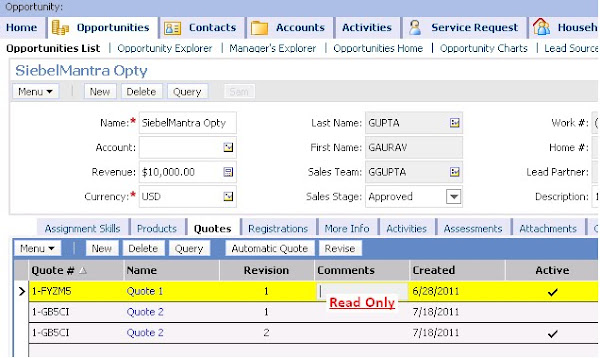

.

Friday, July 15, 2011

How to make all Child BCs read-only when Parent BC becomes read-only?

Today I am going to discuss one interesting requirement where you are required to make all the Child Business components read only as soon as the Parent business component becomes read-only.

Actual scenario goes like this:
As per the business requirement, we need to have the Opportunity business component read-only when Sales Stage is Approved. For this simple requirement we configure the BC User Property: "BC Read Only Field" based on a calculated field "OpptyReadOnlyCalc" as defined below:

User Property
Name = BC Read Only Field
Value = OpptyReadOnlyCalc

Field Details
Name = OpptyReadOnlyCalc
Calculated = True
Calculated Value = IIf([Sales Stage] = "Approved", "Y", "N")


This was working pretty fine, but complexity get added to it when we are required to make all Child business components read-only as well. Though the Opportunity record was coming read-only on the UI, but it was allowing us to create the child record as per below screen-shot:


You can see in the above screen shot (marked in Red), all the vanilla buttons i.e. Add, New, Delete are enabled. Requirement was to disable these buttons and user not allowed to do any operation on the child BCs as well as soon as Opportunity become read-only.

Solution:
To achieve this requirement, you are required to create two more BC user properties on Opportunity Business component.

User Properties

Name = Aspect Child BC ReadOnly: ReadOnly
Value = OpptyReadOnlyCalc

Name = Default Aspect
Value = ReadOnly


Thats it, compile the SRF and VoilĂ , now observe the difference on the UI.


If you want to learn about Aspect User Properties, follow the below link:
http://download.oracle.com/docs/cd/B40099_02/books/ToolsDevRef/ToolsDevRef_UserProps43.html
.


Saturday, January 30, 2010

Latest Siebel Interview Question in Market !!

Some of my friends are in the mood of switching their job these days and in of the discussion I was having with one of my friend asked me this question which he faced in technical round recently. And the question was :

"Can we create a join in a business component without the join specification?"

I think most of you heard this question for the very first time, same is the case with me, provided you are not preparing for any Siebel interview these days :)

If you start running your horses towards technical feasibility regarding this question, you might think of variuos options :

a) When you create a join in Siebel Tools, it is not mandatory to provide the Join Specification, so that means you can create a join without join specification.

b) But what kind of data you will see on the UI? Well, one might say it will do the Cartesian Product of the two tables and you will see one record multiple times on the UI.

c) Since Siebel will consider the row_id of the table in the where clause (in spool query) if you don't specify any join specification (like if you don't mention the destination field or source field while creating Link, Siebel treat it as ROW_ID), and you will not see even a single record if outer join flag is unchecked.


May be you are thinking or some other logical result apart from above 3, but to keep it simple and clear I tried doing it and here is the answer for this:

Siebel will add a where clause as :

a) <_buscomp.rowid> = <_table.row_id> (+)
if Outer Join Flag = TRUE

b) <_buscomp.rowid> = <_table.row_id>
if Outer Join Flag = FALSE

So, you will not see even a single record if you Outer Join Flag = FALSE, because no two row_ids are same.

Logical speaking I don't see any reason for creating a Join under a BusComp and not specifying the join specification, but remember interviewers can ask anything to check your technical skills and may be this will help you in future if will face this question. Good Luck !!

.

Tuesday, January 5, 2010

Running a Workflow Process when "Workflow Process Manager" component shutdown?

Got surprised? I know, this is same reaction I had while brainstorming this with my friend that, "how is it possible?".

Okayy, lets play a question game today here on SiebelMantra and see how many Siebel Gurus visits this post to answer this question:

=========================================================
Is there any way you can run a Workflow Process when "Workflow Process Manager" component is not running on the Siebel Server?
=========================================================

Please provide your comments and I assure you that you will definitely going to learn few hidden truths in Siebel when I will provide my comments after few days with the complete summary for this post. Go ahead, write your views on the question asked.
.

Tuesday, August 25, 2009

Refreshing a record in Siebel applet - Possible ways !!

Sometimes it happens you clicks on a button on an applet which is supposed to do some modification on the current record but you get an error saying : The selected record has been modified by another user. This happens when the same record has been updated into the database (by another user or some other process like Workflow, EAI etc) and system is trying to update the old context of record on the UI. So the better way to get the updated copy of the record by refreshing it and then do any modifications. But the bottom line is you should not loose the context of the current record, so if you are thinking of using ClearToQuery() and ExecuteQuery(), it will not solve the purpose here.

There are few possible ways by which you can refresh a record on the UI, without loosing the context of the current record, depending upon the requirement you can take the decision which one to use.

1. RefreshRecord : Business Component Method

This is a method available on Business Component which are derived from CSSBCBase class. Here is how you can use it, if writing code in PreInvokeMethod of applet :
if (MethodName == "MyMethod")
{
this.BusComp().InvokeMethod("RefreshRecord");
...............................................
}

This method will just refresh the highlighed record on the UI.

2. RefreshBusComp : Business Component Method

This is similar to RefreshRecord method available on Business Component which are derived from CSSBCBase class. The only difference is that it will refresh all the records in the current query context :

if (MethodName == "MyMethod")
{

this.BusComp().InvokeMethod("RefreshBusComp");
...............................................
}

3. FINS Teller UI Navigation : Business Service

Unlike RefreshRecord and RefreshBusComp, this business service can be used for refreshing any applet/buscomp, no matter which class it has been derived from. The method need to use is "RefreshCurrentApplet".
if(MethodName == "MyMethod")
{

TheApplication().GetService("FINS Teller UI Navigation").InvokeMethod("RefreshCurrentApplet", TheApplication().NewPropertySet(), TheApplication().NewPropertySet());

}


.


Thursday, July 30, 2009

How to call "Asynchronous Server Requests" business Service?

Sometimes there is a requirement we need to run few processes that should not stop the user on the screen to go further and do next steps when Siebel is processing something in the background. That is the place when Asychronous processes come into the picture and the solution that Siebel provides for these kind of scenarios is to give a call to "Asynchronous Server Requests" business service.

There are only two ways (that I know my past experience, please add if anyone know more) by which you can call "Asychronous Server Requests" Business Service :

a) Via e-Script : easy way to do that and most people know this.
b) Via Workflow : this is bit tricky
Lets see each one of them in detail. Taken an assumption that you need to invoke a workflow (asynchronously). Assume the workflow name is "Send Email Opportunity Sales Rep", which just sends an email to the Sales Person on the Opportunity and the Input Agrument to the workflow is : "OpptyId" (1-XR45)

Via e-Script :
Here is the piece of code that you can to achieve the above requirement :
var svc = TheApplication().GetService("Asynchronous Server Requests")
var input = TheApplication().NewPropertySet();
var child = TheApplication().NewPropertySet();
var output = TheApplication().NewPropertySet();
input.SetProperty("Component", "WfProcMgr");
child.SetProperty("ProcessName", "Send Email Opportunity Sales Rep");
child.SetProperty("OpptyId", "1-XR45");
input.AddChild(child);
svc.InvokeMethod("SubmitRequest", input, output);
very simple, isn't it. We just need to make sure that the Input Argument of the calling Workflow (Send Email Opportunity Sales Rep) should be the properties of the Child Property Set.

Via Workflow :
Here is the example below in which I have used this and you can accomodate the below two steps in any of the workflow you are using :

Process Properties :
Name : Inputs
Type : Hierarchy

Step1: Set Input Arguments
Business Service : Workflow Utilities
Business Service Method : echo


Step2: Call Asynchronous Service
Business Service : Asynchronous Server Requests
Business Service Method : SubmitRequest


Thats it, you are done. Just to add it here, I tried doing the same stuff with the help of runtime events but it is limitation there and we cannot do that.

.

Sunday, April 5, 2009

What is difference between Siebel Table Apply & Activate?

Recently, one of my friend asked me a very interesting question, which he has faced in one of the technical interview. Actually that question has two parts :

a) What is the difference between Apply & Activate?
b) What exactly happens in the background when you click on Activate button?

So, here the answer goes :

a) Once you have made changes in the database logical schema i.e. added column/index under Siebel Tools -> Table Object, you need to apply those changes in the physical schema as well. So when we click on "Apply" button, system actually connects to the database and synchronize the logical schema with the physical database for that particular table.

b) Once you click on "Activate" button, system actually goes and update the Application Version table of Siebel i.e. S_APP_VER, and let the Siebel Server know that some modification has been done in DB Schema that needs to be taken care for any future EIM activity or any future DBXtract task. So what happens is whenever such task run on the Siebel Server, since DB schema version has been changed by "Activate" button, system updates the diccache.dat file. In my opinion, this doesn't make any sense if we do "Activate" against local database (Please correct me if I am wrong)

To verify this, follow the steps :
1. Run the below SQL in DBISQLC.exe against Local Database.

select last_upd, CUSTOM_SCHEMA_VER, from siebel.S_APP_VER

2. Go to Siebel Tools and click on "Activate" button for any table.

3. Run the above mentioned SQL query again and see the difference in the values.

Hope this helps.
.

Monday, December 29, 2008

PickLists in Siebel

Generally two ways are there in Siebel, by which we can categorize the Picklists in Siebel.
a) Static V/s Dynamic Picklist.
b) Bounded V/s Unbounded Picklist

So, let start with the first categorization.
Static Picklist is the one which is based on "PickList Generic" or "PickList Hierarchical" Business Component and fetches the values from "Administration-Data -> List of Values". "Type Field" & "Type Value" are the two fields where you specify the field name where the LOV Type has been stored (i.e. Type) and the LOV Type value respectively. So the values which appears in this PickList remains same in number (unless & untill you go to "List of Values" view and add some values, and do clear cache).

On the other side, as the name depicts, Dynamic PickList are one whose values can increase and decrease at the run time, due to the fact that these Picklists are based on any business component which is being used for transactional data in the application (like Accounts, Contacts, Orders) etc. So, what happens is, as soon as transactional data is being added by the user, it starts appearing inside the picklist.

The one very well known fact is that generally Static picklist shows as a drop-down on the applet, while values from the dynamic picklist display with the help of Pickapplet.

Second categorization :
When bounded picklist is being used for a field, then user can only selects the value from the values provided by the picklist. Even if user tries to type in the wrong value and tries to step off from the field, system will automatically opens up the pickapplet/drop-down and force the user to selects the value from picklist only.

On the other side, Unbounded Picklist are the one from where user can selects the value from the picklist and also system allows the user to type in some new values in the field as well, which is not existing in the picklist.

Note : When we use the "SetFieldValue()" method on any picklist field of any business component, it does not fire the pickmap, if the picklist is unbounded. To overcome this, we need to used the ".pick()" method.

Record Count : Interview Question

I thought its worth sharing this interview question which one of my friend faced during his siebel technical interview. Here you go :

"I have an "Opportunity" business component with a searchspec {[Opty Status] = "Won"}, whose underlying table is S_OPTY. This table has 100 records, out of which 50 records has Opty Status = "Won" and 50 records having Opty Status = "Lost". Now I have configure an applet on "Opportunity" business component and applet has the searchspec {[Opty Status] = "Lost"}. "

With the above configuration described, I compiled the srf. How many records I will see on the applet?

People have different views on this question. Some will say "50 records with status = Won" because Business Component's search spec will override the applet's searchspec. While some will say applet's search spec will take the precedence, so will see 50 records with Lost Status.

Here is the correct answer : "You will see Zero records".

Explanation:-
let me take you back to the Siebel architecture where we have learned during the Siebel training class, which says Siebel has 3-tier architecture with 3 layers i.e.
a) User Interface Layer (UI Layer)
b) Business Object Layer (BO Layer)
c) Database Layer (DB Layer)

So, when data is being fetched on the UI, database layer will provide 100 records. By the time it reaches BO Layer, due to the searchspec on Opportunity business component, only 50 records with "Won" status will pass the condition. Now when these 50 records will pass onto the UI layer, no record will satisfy the searchspec available on applet (Opty Status = Lost), so no record will be available on the UI.

In technical terms this fact can be easily proved if you go and check the "SQL spool" generated by the siebel via dedicated client. You will see the both condition will be available in "Where" clause of the query and joined with the "AND" clause. So, none of the Opportunity can its Opty "Status = Won", and "Status = Lost", at the same time, consequently no record will appear on the UI.

Join v/s Link : Interview Question

I was just sitting with my colleagues and suddenly one of junior member of our team asked what is the difference between a Join and Link? He was new to Siebel and started learning it, so I thought to make him understand my way. Here is what my view point says :

Anybody came from database background knows, "Cardinality" between two tables can be of four types :
a) One to One
b) One to Many

c) Many to One
d) Many to Many

So, a very simple way to define a Join in Siebel is, "When you have "One" on the right side of the cardinality, there you need to implement Join". Similarly, "When you have "Many" on the right side of the cardinality, there you need to implement Link". That means, "One to One" and "Many to One" corresponds to the Join, while "One to Many" and "Many to Many" corresponds to the Link.

Secondly, a Join exist between a Business Component & a table while Link always exists between two different business Components.

Thirdly, via Join system fetches a single record while Link fetches multiple records.

Fourthly, while implementing Join, we can use the "Join Constraint" to specify the condition on the child entity. In link, we can specify the condition on child entity by putting "Search Specifications".

Note : For "Many to Many" link, we need to make use of Inter table which stores the unique Id of Parent and Child Business Component.